Workbench
The workbench is one version of one board. The address is the board: /p/sensor-rail/v004 opens exactly that version and can be shared or bookmarked.
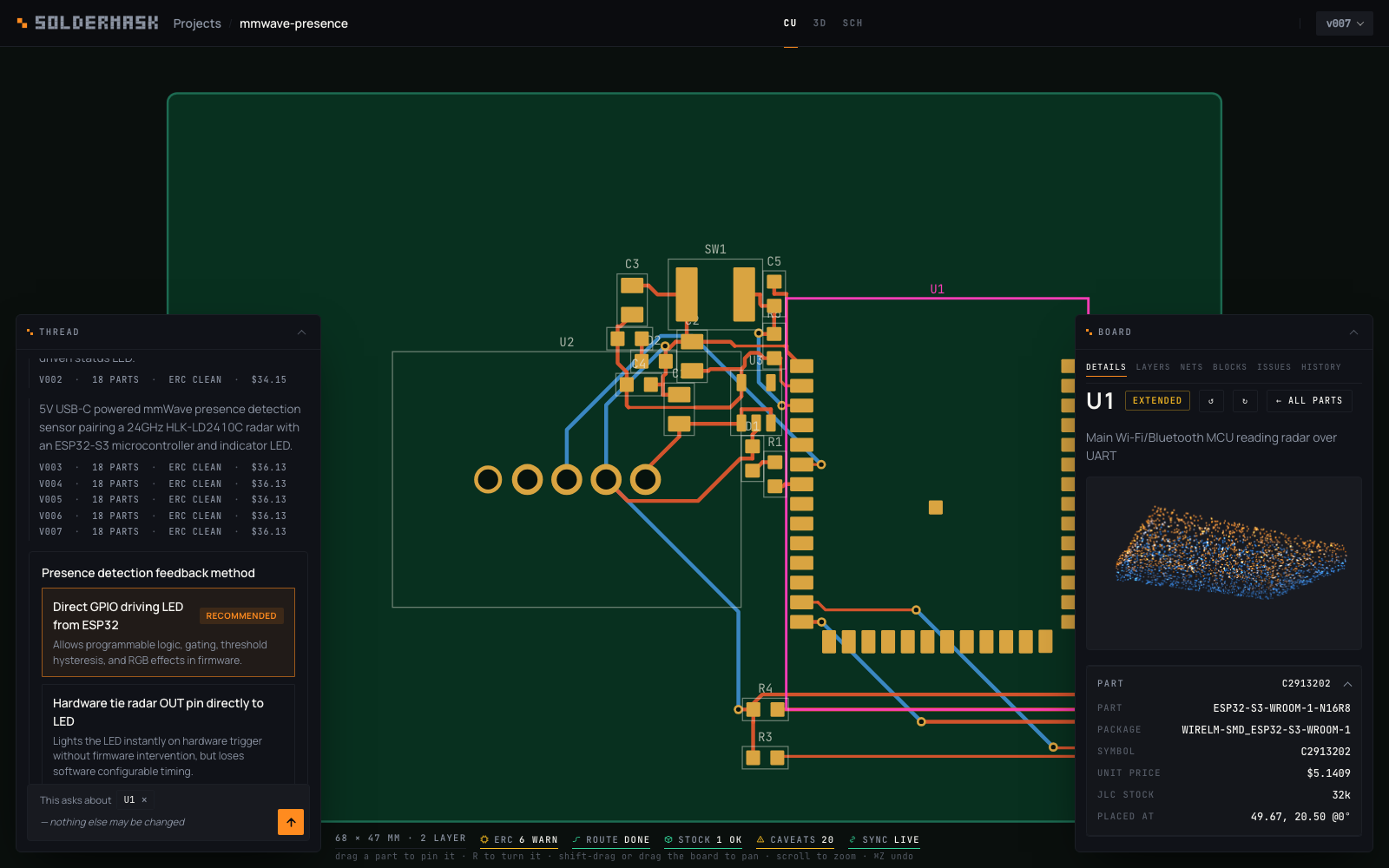
The board is the stage in the middle of a grid, and nothing floats over it. Four regions sit round it, each holding one kind of thing:
- Left — where things come from. The thread, and under the Library switch the blocks and catalogue parts that can be brought onto the board.
- Right — what the stage draws, and what is picked on it. Layers is the stackup (which is also the layer switch), the overlays, the fab sheet, the palette switch and the nets — always on screen; toggles are not a page you visit. Each of the five is a section that folds — the stackup open to start, the rest closed — with a note on its head saying what is inside (2 layers · 1.600 mm, 2 of 3 on, 238 tracks, editor, 12), and what you open stays open on that browser. Pick a part or a track and a second tab appears with its name and the column turns to it: the part as a turning point cloud, its numbers and its pins, or the track's net, layer and length. Layers is one click away without letting go; letting go turns the column back to the layers.
- Bottom — the board. Wide and short: the board's summary and its findings side by side on the first tab, whatever is picked, so clicking a refdes on a finding shows the part in the column and keeps the list. The other tabs are the scope, the chain and history.
- Foot — one info line. What is under the pointer, the drafting readout, what a drag does, and the checks.
Every region folds — the columns to a strip, the detail to its bar — with the chevron in its title bar, and the choice is remembered per region, so the board can have the whole window when that is what you want to look at. The right column opens itself when you pick something. Tab cycles the three views. On a phone the part's card is in the details sheet instead, and the layers are a card of their own behind a Layers button.
Header
- Projects / Sensor rail — the breadcrumb. Click the project name to rename it.
- CU · 3D · SCH — the three views (keys 1 2 3). The current one carries the accent rule.
- v004 ⌄ — the version chip. Its dropdown lists every version with parts and cost; picking one switches the board on screen and makes that version the one the next message edits. Labels show on the chip.
- Rebuild, and a proposal's Discard / Accept, appear in the bar when there is something to decide: they act on the whole document, so they sit with its name rather than over its copper.
The readout
Along the foot of the window: first what the pointer is over — a pad as
U1.1 · GND, a part as J1 · PZ254V-11-02P · HDR-1x2, copper as
+3V3 · B.Cu · 0.25 mm — then the drafting readout, then 28 × 22 mm · 2 layer, then the three ways a board fails, as states rather than counts and each with a rule under it in its own colour. ERC (clean / warnings / errors), Route (done / n incomplete / not run — a net counts as incomplete when its copper misses any of its pins, and the Routing group names the pins), Stock (ok at the selected quantity / short), plus Caveats (how many things the board does not guarantee) and Sync (live when another device is watching). Click any of them to open the detail on the group behind it. Between the readout and the size, dimmed, what a drag does in the view you are in. On a phone the readout rides under the top scrim instead, and scrolls sideways.
CU — copper
The board is drawn two ways, and the switch is at the foot of the Layers column on the right. Editor is the default and is what a PCB editor puts on the screen: a neutral ground, the board outline as a line rather than a filled slab, copper in its layer's colour and translucent so a crossing reads as a crossing, surface-mount pads in that layer's colour and plated holes in one of their own. Board is the picture of the finished article — solder mask, gold, gloss — which is what the 3D view always draws.
Under the board is a grid, stepping through the sizes a board is dimensioned in (0.1, 0.25, 0.5, 1, 2, 5 mm) so that a line lands every 12–60 pixels however far you are zoomed, with every fifth brighter to count by. Along the foot: where the pointer is in millimetres, the grid in force, and the two copper layers. One of them is active — it takes new tracks and is drawn in front, while the other recedes rather than disappearing, because you need to see what you are routing over. Page-up and Page-down switch it, as in KiCad, and so does clicking a swatch. While a track is being drawn the readout adds the run from the last corner, its length, and the length so far.
The board as the fab will see it: pads in the shape the fab flashes (rect, round, or the oval a USB-C's shell peg is), both copper layers (top orange, bottom blue), vias at the size the copper has, each part's silkscreen drawing over a faint courtyard and body (the same strokes the Gerber inks — a module's outline, a pin-1 dot, an LED's polarity bar, the two lines an 0603 wears; see Fab files), reference designators and the maker's mark in the corner. A board built before 15 Sep 2026 carries none of that and draws as it always did: one box per part, a rounded rectangle per surface pad. Drag a part and it stays there. The drag does not move the part in the built board — that file is derived, and the next build would overwrite it. It writes a pin into the design's constraints, which the placer honours, so the part is where you put it and everything else is arranged around it. A pad snaps 1.2mm to a pad it shares a net with; nothing snaps to a grid, because a board is held together by nets and not by a lattice. Alt held during the drag turns the snap off, which is what you want on the one move it is wrong for: taking a part clear of the thing it is wired to. A pinned part carries a mark at its corner. ⌘Z undoes, ⇧⌘Z redoes.
The part under the pointer is outlined before you press. Half the parts on a dense board are a few pixels across at the zoom the whole board is read at, and the outline is the answer to which one will this get. What it outlines is the hit box itself, so it is a report rather than a decoration. Two rules decide it: the smallest box containing the point wins — a 0402 beside a 40-pin header's label is the more specific claim about that point, and the header being drawn later is nothing to do with what the pointer was aimed at — and a part smaller than about 12 pixels on screen is given a target that big to be grabbed by. A part bigger than that keeps its exact edges, deliberately: bare board beside a chip has to stay bare board, or a pan that starts there picks the chip up.
Arrow keys move the picked part one grid square, ⇧ and an arrow ten. It is the same statement as a drag — one pin, one undo entry, true at the next build — and it exists because a pointer cannot say 0.25mm: one dispatched pixel is a fifth of a millimetre on a 100mm board, and a trackpad is worse. The step is the grid's own, the one the readout is showing.
F flips the picked part to the other side of the board, and back — KiCad's key for the same gesture, and a to back / to front button in the panel for a phone. The same pin, the same undo entry, the same rebuild makes it true: the pin gains side: back, and the placer's own rule decides who may go (placer.back_ok) — a part with a lead through the board is on both sides already, and a connector, a switch, an LED or a module with an antenna stays where a person can reach it; refused, the hint line says which. A part on the back is drawn through the board: a dashed outline, its pads in the back copper's colour, mirrored on screen once it is pinned to the other side from the one it was built on, and it recedes with the back copper while the front is the active layer (Page-up / Page-down). In 3D it hangs under the board, upside down. A drag, a turn or a nudge keeps the side.
While you drag, the copper on that part's nets goes faint and their ratsnest comes up: those traces run to where the part used to be, and saying so is the point. Not the pour, and not a poured net's ratsnest (since 17 Sep 2026): the plane joins those pads wherever the part goes, and a spanning tree over every ground pad, lit on every drag, read as the router wanting to route ground. A poured net has no ratsnest anywhere -- the Layers count is the nets that have one -- while a track on it, a stitch stub or ground routed under the pour, still goes faint. Nothing is rebuilt as you drag — one placement is half a second and the router is ten, far too slow to sit between a pointer move and a frame — so a bar appears over the board naming what is pinned and how much copper is now from the last build, with the Rebuild button that makes it true again. Only a rebuild makes a version; the pins themselves are saved a second after you stop moving.
Click a track to select it. Copper is an object like a part is: picking one colours it in the selection colour and shows its net, layer, width, length and how many of its corners are rounded, and says whether the router drew it or you did. Copper you drew is asked about first where the two lie on top of each other — which is exactly what taking a track over makes — and a part still wins over both, because a click on a part has always meant the part.
Del deletes a track you drew, from the keyboard or from Delete this track in the panel, as one undo entry. It does not delete one the router laid, and the panel says why rather than the key doing nothing. The router's copper is not an input to anything: the next build derives it from the netlist again, so taking it off the screen would change the picture and not the board you would get. Take this track over is the thing that is real — it copies the run into constraints.tracks, where the next build is told to keep it rather than route that net again, and where it is then yours to delete or redraw.
Move a part and its copper comes with it. The end of a track that sat on the pad goes where the pad goes, the far end stays, and the run between stretches — so the board shows what the move did rather than only that it broke something. It is a picture and not a promise: the stretched track is the last build's copper with one end moved, the bar over the board says how many tracks are stretched, and the router decides what the net actually becomes on the next build.
Route a track yourself. X arms routing — KiCad's key; W still works. Then either gesture works, and neither pans the board: press on a pad and drag to where the track should end, or click a pad, move, and click again for each corner. The track takes the starting pad's net and its width. While routing, every pad is ringed as a node you can land on, and once a net is chosen its own pads are ringed brighter. You can also start from — or join — copper that is already on the board: an existing run's end, or any point along it on the net you are routing, which is how a track the router got half right gets fixed and how a three-pad net gets finished by hand. Each click lays a corner, and a click on another pad of the same net — or on that net's existing copper — finishes it. Two segments come out of every click, one on an axis and one at 45 degrees, which is what any PCB editor draws and what the router itself emits. V drops a via and carries on across the other side, Slash or Space flips the corner between axis-first and diagonal-first (KiCad's key and Altium's), Backspace takes back a corner, Enter or a double-click or a right-click stops where you are, Esc drops the track and a second Esc leaves the mode; alt-click lifts a track you have already drawn. Shift-drag still pans without leaving the mode.
Hand-drawn copper is a constraint exactly as a pin is: it does not go into the built board, it goes into constraints.tracks, and the next build hands it to the router as copper it may not move. So the answer to what happens to my track when I rebuild is that it is an input to the rebuild — and a track that only goes half way is not a claim that the net is done: the router sees the rest as unconnected and finishes it around what you drew. The build says which of your tracks came back, in the notes, and puts it in the gaps list if one did not.
Drag bare board to pan, or shift-drag from anywhere; scroll to zoom about the pointer, double-click to fit the board again. On a touch screen one finger pans and two pinch about their midpoint. Click a part to select it, click it again or click bare board to let go; click a net in the Nets tab to isolate it — everything else dims. The Layers tab toggles top copper, bottom copper, vias, pads, silkscreen and the ratsnest, with a count of each. On a board whose placement was rated by a model with a heatmap head there is one more, off by default: Predicted congestion, the copper the routability model expected in each cell before the router ran (warm, saturating at two full layers) and the pins it expected the copper not to reach (ringed in the selection colour). Turn it on over the routed copper and the two can be read against each other; see Routability.
3D
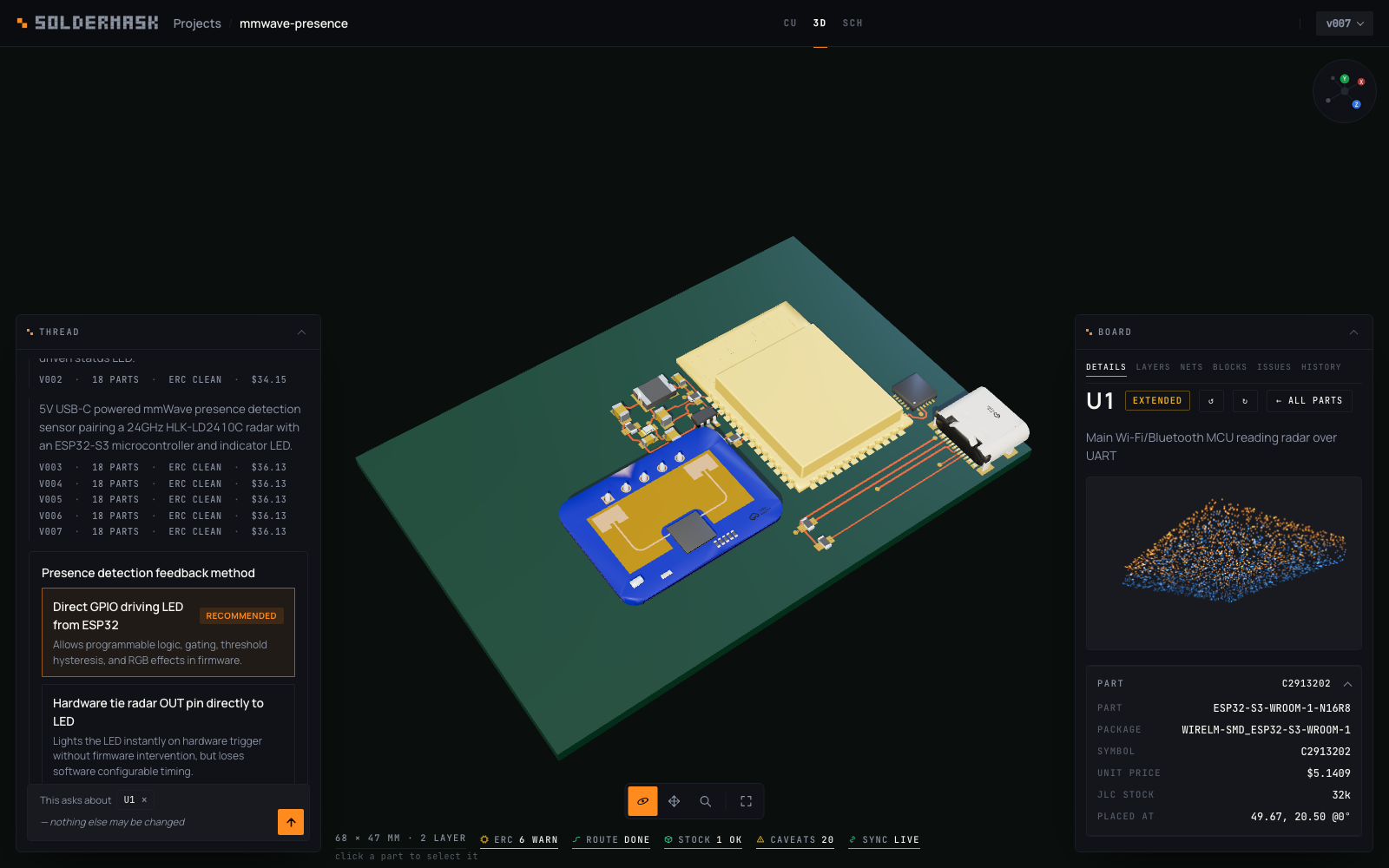
A rendered board: FR4 with a glossy mask, gold pads, the maker's mark in silkscreen ink and every part drawn from its vendor's 3D model where one exists (see KiCad and 3D models); parts without a model are built from their package profile. A pill at the bottom of the pane — Orbit, Pan, Zoom, then Frame — picks what a plain drag does; Shift-drag pans and the wheel zooms whatever the pill is set to. Click a part to select it. On a phone, Tilt orbits by moving the phone instead.
The axis ball in the corner reorients the camera without a drag: click a labelled face (X, Y or Z) for a side-on view of that axis, the small unlabelled dot opposite it for the other side, or the centre to return to the opening view. It has five faces rather than six — nothing this view draws is ever meant to be seen from underneath.
SCH — schematic
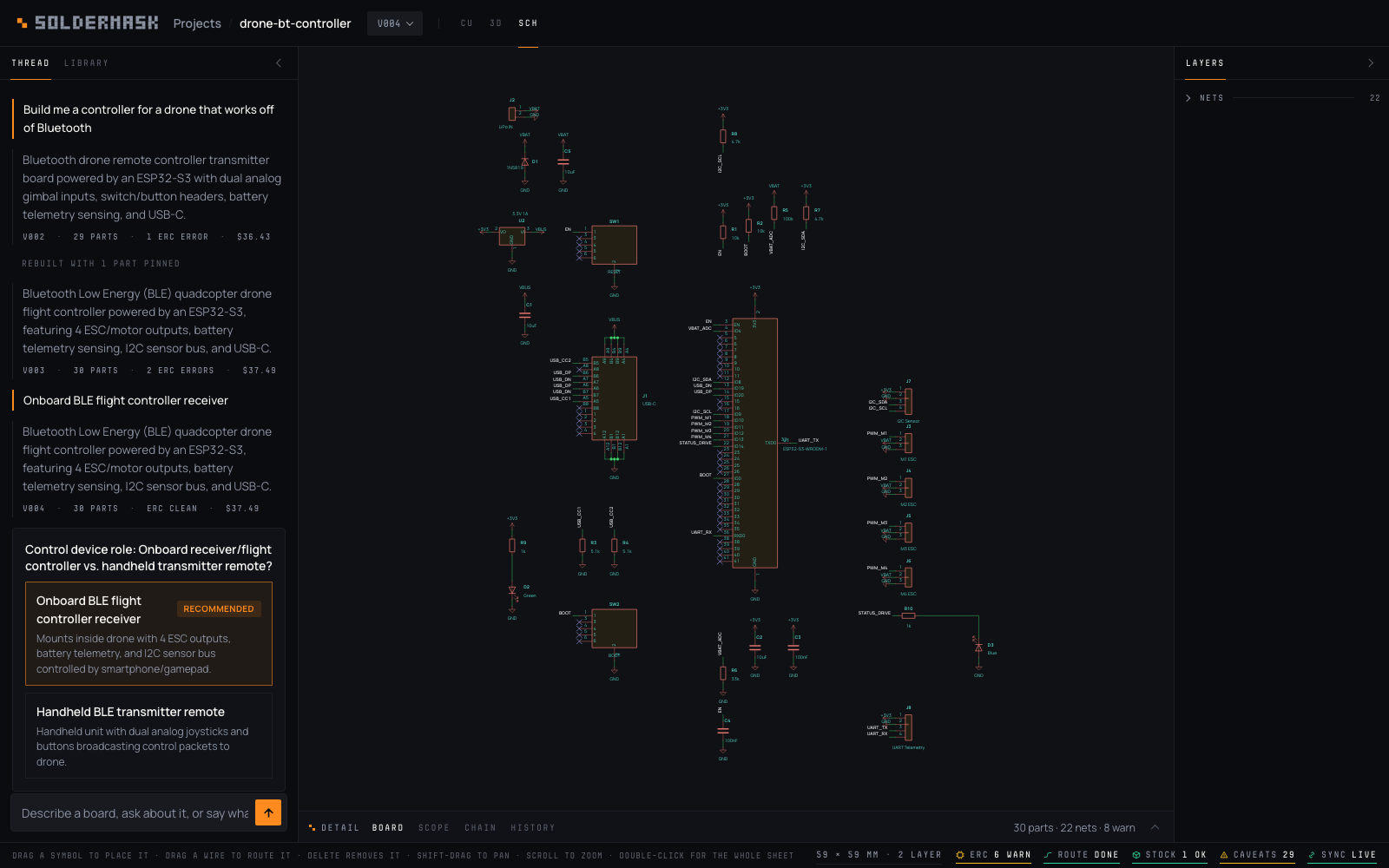
A real sheet: KiCad's own symbol for every part, power and ground as port symbols, net labels where a wire would have to cross the drawing, orthogonal wires with junction dots where it need not, a worksheet frame and a title block. It is laid out on the server (soldermask/sheet.py), stored on the board as sheet, and the <board>.kicad_sch in the version's files is written from the same record — so the sheet on screen is the sheet KiCad opens.
How it is laid out. Every part is given a role: an IC, a connector, a series part, a pull-up, a pull-down, a decoupling capacitor, a power inlet. The flow runs left to right — power inlets and input connectors at the left, outputs and indicators at the right — with each signal net's direction read from the library's pin types, the pin's function name, and the net's own name from the microcontroller's side (PWM_M1 leaves it, VBAT_ADC arrives), and the parts in each column ordered by a barycentre sweep so the wires between columns cross as little as possible. Pull-ups sit in a row above the IC they serve with a rail port on top; pull-downs and decoupling capacitors in a row below with ground underneath; an LED hangs under its resistor. Supply pins never travel as wires: each ends in a port, and adjacent supply pins of one part share a short bus and one port. A signal net is a wire only when it is two pins, close together, and the orthogonal route between them crosses nothing — every candidate is checked against every symbol body and every other pin, because in KiCad a wire end on a foreign pin is a connection — and otherwise it is a net label at each pin, the way any ESP32 sheet is drawn. Measured on the 17 projects in the tree on 17 Sep 2026: 0 wire segments through a symbol body, 0 pieces of text over other text, 0 wires longer than two inches, 0 symbols on top of each other, 1–22 ms a sheet.
Drag a symbol to place it. Dragging says where a part reads best; the position is kept in constraints.sheet — the board's gesture, on the other drawing of the same circuit. The symbol follows the pointer; on the drop the position is saved, the server lays the wires again around it (its satellites — the LED under a resistor, the decoupling under an IC — follow), and the sheet comes back in one round trip. Positions snap to KiCad's pin grid, a placed symbol carries a mark, and ⌘Z undoes. Shift-drag pans; scroll to zoom; double-click for the whole sheet. Drag a wire to route it yourself. A net drawn as a trunk — three or more pins close together, one horizontal lane with a drop to each — can be taken hold of and moved up or down, and that lane is kept in constraints.wires rather than the drawn line, which is what makes it survive the next build. A net drawn as labels has no lane to move.
Two marks matter: a no-connect X on a pad means the pad is on no net, and an open circle with a net name means a one-pin net. Both are real gaps in the design, not drawing faults.
Blocks
The Blocks tab is a library of circuit fragments mined from finished boards — a regulator with its capacitors, a CAN transceiver with its termination — each one recurring on at least three boards by different people, because one designer's habit is not an idiom.
A row carries the evidence for the block: how many boards agreed, what ports it offers, and whether it builds — resolves against real parts and passes ERC when this pipeline puts it together. A block that does not build is listed anyway and says so; the reason is usually a part nobody stocks any more rather than a circuit that is wrong.
Add to the board drops it in: its parts join yours, and a port it shares a name with joins that net rather than making a second one wearing the same name — connecting blocks is a net merge, not a wire, which is why two blocks compose where two reference designs would need netlist surgery. It arrives as a proposal like any other change, because adding a regulator changes what the router has to do and what the board costs.
Parts
The Parts tab is the catalogue underneath the block library: JLCPCB stock, searched by part number or by what the part is — AMS1117-3.3, 10k 0603, USB-C. Only parts in stock are listed.
A row carries the distributor's facts — package, unit price, how many are on the shelf — and one that is not on the distributor's listing: whether this pipeline has its own footprint for that package, or would take the pads from the vendor's published drawing of that exact code. That is the difference between IPC geometry we drew and geometry nobody has verified, and it is the fact that decides whether a part is usable here.
Choose… opens the design line being written: what kind of part it is, its value, what it is for, and a net for each pin. The kind is read off the catalogue where the category says plainly what the part is, and left blank where it does not — it decides which electrical rules the part is checked against, so it is asked rather than guessed.
The pins offered are pins the build will accept. Choosing a part resolves it first — the same footprint, the same symbol, the same lookups the board would be built with — and every name in the list is checked against the pad it claims. A two-terminal part offers 1 and 2; a part with a symbol offers its function names, qualified by unit where a dual op-amp uses + twice; a pad the symbol does not model is offered by number and says why. A pad nothing can name says that too, rather than being quietly missing.
The part that lands is the row you read. A pick is pinned by its LCSC code and nothing re-searches it, which matters most where the search would have been reasonable: 10k 0603 has a thousand equally good answers, and AMS1117-3.3 has a sibling that is the 5V part.
Wiring nothing to it is allowed. The build then comes back with an ERC error naming the part as an orphan — that is the gate working, not a failed add — and the pins can be wired here or described in the chat afterwards.
Like a block, it arrives as a proposal.
Proposals
A change to a board that already exists does not become the board. Type an instruction and the model returns what changes — a patch, not a redrawn design — which is applied, built, and put on screen as a proposal, under a bar naming what accepting it would do:
Proposed · changes R1 · 1 net change: GND · 1 fewer ERC error · +$0.40 a board [Discard] [Accept]
The board under that bar is the proposal. That is deliberate: a list of changed net names is not a picture of what the router did with them, and there is no way to accept half a route — so the unit of acceptance is the whole change, and you look at it. Accept makes it the next version; Discard puts the board back. Until one of them is pressed nothing is written to the project, and a proposal survives a reload because it is a file in the project directory.
Scope it by selecting. Whatever is selected — a part, a net, several parts if you Shift-click them — is what the instruction is about, shown as chips under the composer. It is not a hint the model may ignore: what is in the scope may be changed or removed, anything may be added, and everything else is refused by name. Ask about the LED circuit and the regulator cannot be dropped. With nothing selected the instruction is about the whole board.
A project with nothing built yet draws its first board the old way — there is nothing to scope to, and nothing to review a change against.
The build log
A turn is a pipeline, and the thread shows it as one rather than as a spinner. While a turn runs, the reply's place holds one row per stage — Thinking, Resolving parts, Placing, Routing, Writing fab files, Checking stock, Fetching 3D models, Saving — with the stage it is on traced live in the accent and its clock running, the stages behind it ticked with the time each took, and the stages still to come dimmed underneath. A build the router had to try again shows a Routing row per placement; a build that came back dirty and was revised shows Revising and then the stages again.
When the reply lands the rows stay with it, under a line that says what happened and how long it all took — Built · 8 steps · 1m 12s — and each row says what its stage came back with: how many parts resolved, how many placements were rated, what the router said of each attempt (and when the second router had to finish what freerouting left), the price, the version. The newest reply's log is open; older ones fold to that line and open on a click.
The log is the turn's own record, not the page's. It is kept with the turn, so a reload or a second device shows the same log the first page saw, and a page that opens while a build is running picks the log up from the stage it is on with everything before it already filled in.
While the Placing row runs, the stage shows it. The build anneals six placements at once and the model ranks them, and for as long as that takes the board gives way to six small ones, one an anneal: each part's courtyard moving as the anneal moves it, the flightlines between the parts, a hairline filling as the anneal cools, and the seed under each. When they settle, each says what the model rated it and the one the router is handed first is outlined in the accent — a rating, not a verdict; whether it routes is the router's row, and on one board's own anneals the model's order is close to chance (see the routability page). The film stays up through the routing, so what is being routed is what is on the stage, and goes when the board lands. It is drawn from the pipeline's own messages, ten a second, and every device looking at the project sees the same film; a page that opens partway through sees the log and not the frames it missed, and a build with every part pinned has nothing to show and shows nothing.
The thread reads the same after a reload as it did live, and it has four kinds of row. What you typed carries the accent down its edge. A reply is plain text. A turn the app started on its own — Rebuild, Route again, Place again, a file read in — is a note in the label face, in the words the record keeps (routed again from v007: same parts, same placement), because nobody typed it; and a turn that failed before it answered is red, with the reason, and stays on the record rather than vanishing on the next reload. A turn whose build came back dirty and was revised made two versions but is one exchange: the reply under your message is the revision's, with revised from v001 on the line beneath it. A note turn repeats the design's summary word for word, since no model spoke; the copy is dropped, so four route-agains are four verdict lines and four logs rather than four copies of one paragraph.
While a proposal stands, the board on screen is the proposal's — after a reload too — and the pin bar stays out of the way until it is accepted or discarded. The composer says when it cannot send (no model on the server, a standalone export) rather than swallowing Enter, and the thread stays where you scrolled it while a build is running; it follows the end only when you are already there.
The scope
The second tab of the detail is an oscilloscope: voltage against time for every net the simulation traced. The probe is the selection — the net picked on the board or in the right column is the trace in the accent and the rest recede, and a chip in the legend picks a net the same way the net list does (Alt-click hides a trace). Hover reads the time and every net's value into the chips and into the info line along the foot; click drops cursor A, Shift-click cursor B, and the legend says Δt, the frequency that interval is, and ΔV on the picked net. Scroll zooms the time axis about the pointer, drag pans, double-click shows the whole run. Past two samples a pixel the trace is drawn as the minimum and the maximum of every pixel column, so a spike stays visible however far out you are. The bar above the tabs drags to give the region more height.
The data is sim.json beside the version's board.json, served like the
meshes and fetched when the version opens:
{"kind": "transient", "engine": "ngspice 44",
 "t": [0, 1e-6, 2e-6],
 "nets": {"VIN": [0, 4.9, 5.0], "+3V3": [0, 0.2, 1.1]},
 "stimulus": [{"net": "VIN", "kind": "step", "v": 5.0}],
 "unmodelled": ["U2"], "notes": [], "seconds": 0.8}
t is seconds, ascending; every trace under nets has the same length;
unmodelled names the parts the deck could not represent, and the chain's
Sim box carries them as warnings. A version without a sim.json gets a
tab that says so — a board with no simulation never shows a flat line. The
file is written by the simulation stage of every build
(the pipeline page says what is in the deck
and what is not); a version built where ngspice is not installed, or from
a design with no ground or no declared rail, has no file and a note on the
board saying which.
The chain
The second tab of the detail is the build that made the board on screen, as a row of stages in the order the pipeline runs them — design, resolve, sim, place, route, pour, check, fab, price — each a box with its time from the turn's log and its own readout off the board: how many parts resolved and how many nets, how many placements were rated and what the model said of the one kept, which router laid the copper and whether the second one had to finish it, the pour's stitching vias, its thermals on one spoke, and -- its own warning line -- whether ground was routed as tracks under it after the fill could not reach every pad (since 17 Sep 2026; "GND poured" alone had been true of a board with 26 ground tracks), ERC, DRC and the verdict, the price at the selected quantity. What a stage could not do is under its own box, in the warning colour, rather than in a list somewhere else. A box with something behind it is a button and opens the findings for that stage; a stage that did not run is dimmed and says so. A version built before the pipeline recorded a routing report shows not run for place and pour, which is what happened.
Three of the boxes carry a button, because those stages can be run on their
own. Simulate runs the simulation stage on this version's netlist —
seconds, no anneal, no router — and writes sim.json beside the version rather
than making a new one; it is how a version built before the stage existed
gets a scope. Place again is a rebuild with the next anneal seed: the same
design and pins with the same seed is the same placement, so asking again has
to ask differently. Route again keeps this version's parts and placement
and runs the router on them as the constraints now stand — after a track you
drew, a floor you set, a part you sent to the back — without the anneal
moving anything; the router is deterministic, so on an unchanged version it
reproduces the copper. The last two are builds and make a version like any
other; the thread shows their log.
The rack
Above the boxes is the rack's front panel: the eight knobs that change how the board is built rather than what is on it, in one strip — Live's macro controls, in front of the devices they reach into.
| knob | what it is | where it lives |
|---|---|---|
| Router | the A* router first (the default since 13 Sep 2026), or freerouting; the other gives a second opinion | rules.router |
| Seed | the anneal seed; the same design, pins and seed is the same placement | rules.seed |
| Pour | ground poured as a plane, or routed as traces | rules.pour |
| Precedent | whether a corpus board like this one may seed the anneal | rules.precedent |
| Mark | the maker's mark on the silkscreen, or a board with none | rules.mark |
| Floor | a floor under every routed net's width, in mm | rules.min_track_mm |
| Sides | whether the placer may use the back | board.sides |
| Outline | whether the board may grow to fit its parts | board.fixed |
Every knob is a key of the constraints block, saved the way a pin is — a second after you turn it, no version — and honoured by every build after. A knob that has been set carries a dot under its label. Turning one is a change the board on screen does not yet reflect, so the stale bar says what the next build will use (next build: the A* router, seed 3, no pour) with Rebuild beside it; Place again on the Place box turns the Seed knob up one and rebuilds, which is why the version records the seed it was built with.
Variations are saved sets of the knobs, kept on the project — Live's macro variations. + save names the knobs as they stand; a chip recalls its set onto the next build, every knob it carries set and every one it does not carry cleared, the pins and the hand copper untouched; the chip whose knobs are exactly the current ones is lit; double-click renames, × forgets. A version is the other snapshot — what was actually built — and the chain's boxes read from that.
The detail
The first pill is the verdict, from the same pass rule the evaluator scores with: works, or does not work with the count of clauses it failed, and clicking it opens a Verdict group that names them -- a part that did not resolve, a net the design asked for that is gone, an ERC error, a net unrouted, a violation in the poured copper. Every one of those is also a line item further down; the pill is the sentence the line items had been standing in for. A version built before the build had a verdict shows no pill rather than a false works.
The Board tab, with nothing selected, is two columns. On the left:
- Build — cost and stock at 1 / 10 / 25 / 100 boards: parts, setup fee, per-board price, and a table of every part with the quantity needed, JLCPCB stock and how many runs the stock covers (
999+×past a thousand).livemeans stock was checked at build time;cachedmeans it was not. Lines that block the run are listed underneath. - Generation — the prompt, the model, tokens and cost, and the model's stated assumptions.
- Board — parts, pads, nets, copper length, vias.
- Parts — every reference designator; click one to select it.
On the right, always, the findings: Verdict, Electrical, Routing, Stock, Not guaranteed (what the model said it could not do, unresolved parts and pins, notes about substitutions or unverified footprints — empty means every part resolved and every IC pin was verified against its symbol), Precedents and Live sync, each a group with its count, and a refdes or a net on a finding selects it in every view.
The part's card — in the right column on a desktop, and on a phone in this sheet under the part's name — is the part (manufacturer number, package, symbol, unit price, stock, position and rotation) and its pins with the function name and net of each, with buttons to turn it a quarter turn either way and to Remove it.
Remove — or Del with a part picked — takes it off the board, and it goes through the same gate as adding one: no model is asked, but the board without the part is resolved, placed, routed and priced, and offered as a proposal. Nothing is destroyed by pressing it; Discard puts the board back exactly as it was, and only Accept makes a version. The reason it is not instant is that a part leaving takes its pins with it and a net left with one pin goes too — the reply names those nets, the gate counts them, and what is left has to be built before anything can say whether it still works. Shift-click several parts first and all of them go in one change; the whole board at once is refused.
History is described in Versions and history.